






|
|
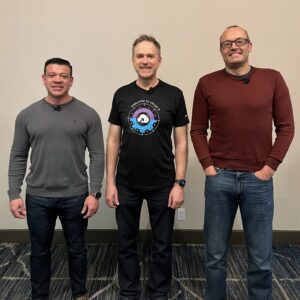 Dave Morera, Eric Gray, and Dimitri Desmidt presented for VMware by Broadcom at Cloud Field Day 25 |








































































































































































































































































































































































































































































































This Presentation date is March 12, 2026 at 9:00 - 10:30.
Broadcom will be at Cloud Field Day 25 to demonstrate how VMware Cloud Foundation 9.0 can help customers improve the efficiency of their increasingly expensive server hardware, while further closing the capabilities gap between public and private cloud with capabilities suc as VPCs and Database as a Service
The DRAM Barrier – Why VMware Advanced Memory Tiering is a Data Center Game Changer with VMware
Watch on YouTube
Watch on Vimeo
Memory is often the most expensive and restrictive bottleneck in modern datacenters. VMware Memory Tiering (an industry exclusive) solves this by automating data placement across high-performance and cost-optimized memory tiers. This session explores how this unique hypervisor integration drives 40%+ TCO savings, improves VM density, and ensures smarter resource consumption. Learn why VMware is the sole leader in transforming memory from a hardware constraint into a strategic advantage. This innovative feature, “VMware Advanced Memory Tiering with NVMe,” addresses the rapidly escalating cost of DRAM, which now accounts for up to 96% of a server’s bill of materials. Presented as a core component of vSphere, and thus included in VMware Cloud Foundation (VCF) and VMware vSphere Foundation (VVF), this technology aims to overcome the “DRAM barrier” by intelligently managing memory resources.
The core of VMware Memory Tiering involves using less expensive NVMe devices as a secondary memory tier, with DRAM remaining the primary, high-performance tier (Tier 0). From a VM’s perspective, this combination appears as a single, logical memory space, making the underlying tiering transparent. VMware employs a proprietary algorithm that constantly monitors memory page activity, classifying pages as hot, warm, or cold based on recent access patterns. When DRAM utilization reaches a configurable threshold (e.g., 70-75% pressure), cold, inactive pages are proactively moved to the NVMe tier, freeing up DRAM for active workloads. This intelligent, proactive approach differs from reactive measures like swapping or ballooning, enabling customers to achieve over 40% reduction in total cost of ownership by purchasing less physical DRAM, and doubling VM density on existing hardware due to more efficient CPU and memory utilization. The NVMe devices must be directly connected, dedicated solely for this purpose, and meet specific endurance and performance requirements, with hardware RAID support for data mirroring and redundancy.
For operational flexibility, VMware Memory Tiering offers configurable ratios between DRAM and NVMe, starting with a default 1:1 ratio (providing 100% more memory capacity) and scalable up to 1:4 (a 4X increase), with a maximum partition size of 4TB. This allows administrators to adjust capacity based on workload needs without physical hardware changes. The feature seamlessly integrates with existing vSphere functionalities like HA, DRS, and vMotion, as well as various encryption methods (host, VM, vSAN), with vMotion being “tier-aware” to handle VM migrations between hosts with and without memory tiering. However, certain specialized VMs, such as latency-sensitive applications, monster VMs, and security-hardened VMs (e.g., those using TDX or SEV for memory encryption), are not supported as the hypervisor cannot classify their encrypted memory pages. VMware provides extensive documentation, including performance whitepapers, deployment guides, and Hands-on Labs, to aid in understanding and implementing this transformative technology.
Personnel:
Database as a Service (DBaaS) with VMware Data Services Manager from VMware by Broadcom
Watch on YouTube
Watch on Vimeo
Open-source databases like PostgreSQL and MySQL are in high demand, but provisioning them often creates bottlenecks for vSphere admins and DBA teams. Ticket queues grow, governance slips, and “shadow IT” introduces risk. In this video, we show how VMware Data Services Manager (DSM) enables on-demand Database-as-a-Service (DBaaS) on VMware Cloud Foundation. Learn how infrastructure policies and RBAC deliver secure, self-service database deployment while maintaining visibility and control. We also highlight how DSM automates HA deployments, read replicas, backups, and point-in-time recovery, eliminating database sprawl and simplifying Day 2 operations. This addresses the common challenges organizations face with database sprawl, lack of governance, configuration drift, and ticketing bottlenecks when developers arbitrarily spin up VMs with databases without proper oversight.
VMware Data Services Manager (DSM) integrates as an appliance and vCenter plugin within an existing VMware Cloud Foundation (VCF) environment, leveraging management and workload domains. As a vSphere administrator, you retain control over the infrastructure, defining compute resources (clusters, resource pools, supervisor namespaces), storage policies (vSAN, NFS), and networking (VLANs, VPC subnets). DSM handles IP address assignment and allows administrators to define VM classes (e.g., small, medium, large) to provide granular control over resource allocation. Supported databases currently include PostgreSQL, MySQL, and Microsoft SQL Server in tech preview, with the system designed using cloud-native Kubernetes technologies.
The administrative setup involves configuring S3-compatible backup targets (on-prem or cloud), enabling specific database versions, creating DSM namespaces to group resources, and linking directory groups (such as “developers”) to these namespaces with appropriate DSM user roles. Data service policies tie together specific database engines, namespaces, allowed versions, infrastructure policies, and backup locations, providing robust guardrails for self-service. For developers, this translates to a streamlined experience where they can easily provision single or clustered database instances, perform version upgrades, enable read replicas for scaling, and manage backups, all through a simplified UI or API, receiving a ready-to-use connection string for their applications. DSM also offers basic monitoring and integrates with VCF operations or Prometheus for more comprehensive metric collection, ensuring health and resource management while providing flexible point-in-time recovery options.
Personnel:
Why VCF Networking NSX Is Essential Even in a VXLAN World with VMware by Broadcom
Watch on YouTube
Watch on Vimeo
Physical fabrics may provide VXLAN, but modern private clouds demand far more than basic overlay connectivity. This video explores how VCF Networking (NSX) decouples networking from the physical fabric, enabling automated, policy-driven network services that integrate natively with vCenter and VCF Automation. We also examine Virtual Private Clouds (VPCs), which empower developers to instantly provision secure, multi-tenant environments without deep networking expertise. Discover why VCF Networking is not simply an overlay but the foundational layer that unlocks agility, operational simplicity, and true cloud operating models inside the modern data center. Dimitri Desmidt shows why network virtualization within VMware Cloud Foundation (VCF) is essential, even if the underlying physical network already supports VXLAN. He highlights that while physical networks provide basic overlay connectivity, they fall short in delivering the comprehensive network services – such as switching, routing, load balancing, and firewalling – that modern applications require. Managing these services manually on physical infrastructure for each new application often entails a cumbersome, ticket-driven process spanning multiple teams and interfaces, delaying application deployment by weeks or even months.
VCF Networking, powered by NSX, addresses this by bringing these crucial network services directly into the cloud platform, enabling a self-service, automated consumption model. This shift eliminates the need for manual configuration and inter-team coordination, drastically reducing network provisioning time from weeks to mere seconds. A key innovation in VCF 9.0 is the introduction of Virtual Private Clouds (VPCs), which adopt the familiar industry-standard concept. A VPC is a self-contained “network bubble” that developers or vCenter administrators can instantly provision with subnets and automated IP address management. VCF is pre-configured with an IP block designated for future application networks, ensuring that newly provisioned subnets do not conflict with or overlap existing physical network infrastructure, thereby preventing IP conflicts and maintaining network stability.
VPCs offer granular control over network access, allowing for “public” subnets exposed to the external world, “private transit gateway” subnets for communication within a tenant, and “private VPC” subnets for isolation within a single VPC bubble. While VCF Networking handles basic access control and Network Address Translation (NAT), more advanced security needs, such as protocol-level firewalling, IDS/IPS, and malware inspection, are addressed by vDefense. The VPC gateway is fully distributed, running as a process within each ESX host, making the creation of new subnets completely transparent to the underlying physical fabric. This design means the physical network only sees encapsulated traffic between ESX host IPs, so no changes are required to the physical switches. This approach not only provides exceptional flexibility for dynamically connecting virtual machines but also allows for overlapping private IP address spaces across different VPCs, as all outbound traffic is automatically NAT’d, preventing conflicts. Additionally, VCF enables administrators to set quotas for network resources, ensuring fair usage and resource governance across various tenants or business units.
Personnel: